Condition
FCC ID
Part#
Part #: 26671
Dealer part #
Buttons
Frequency
Battery Type
Attention: Please note there are several compatible remotesthat look similar but not exactly like the photo pictured. We will do our bestto ship you the remote pictured; however, the remote you receive may lookdifferent than the remote pictured. No worries, the board will program to yoursystem the same.
Condition Explanation: Pre-Owned
Pre-Owned: An itemthat has been used previously. The item may have some signs of cosmetic wear,but is fully operational and functions as intended. Scroll through listing forfull details and description of any imperfections.
Programming Instructions:
Your system can learn up to 4 transmitters. The followingprocedure will show you how to add additional transmitters or replace old ones.The remotes in this package have already been programmed to the control module.
Each transmitter can be programmed one button at a time oryou can use an auto learn procedure that learns the intended factoryconfiguration. Learning one button at a time is generally only used when usingone transmitter to control two different cars. Being able to program functionsto different channels on each transmitters prevents multiple cars fromresponding simultaneously.
1. Turn the ignition ON
2. Press/release the Momentary switch the same number oftimes as the desired transmitter learn step number, and then Press/HOLD.
3. After holding the Momentary switch for 2 seconds the LEDwill begin to flash to indicate the number of the accessed transmitter learnstep.
4. Press the transmitter button that you want to controlthe function assigned to that channel. The Horn/Siren will emit a long chirp.
NOTE: For transmitter learn Step #1, you must press the“*â€button on the transmitter. This will automatically program the transmitterbuttons to the default function configuration. See the transmitter button autolearn chart for the assignment functions.
You can learn more than one transmitter function withouthaving to repeat the entire procedure by advancing to the next channelimmediately after programming your first channel.
To do this, first release the Momentary switch and thenpress/release it the same number of times as the difference between the currenttransmitter learn Step and the desired transmitter learn Step, and thenpress/HOLD it.
Example:
To advance from Transmitter Learn Step 2 to TransmitterLearn Step 8, release the
Momentary switch and then press/release it 6 times and HOLDit on the 7th press.
After holding the Valet switch for 2 seconds the LED willflash 8 times and repeat. You can now learn a transmitter button to step 8.
There are several ways to exit Transmitter Learning, byTimeOut, Ignition or Momentary switch presses.
1. TimeOut: If more than 15 seconds elapse betweenMomentary switch presses or transmitter signals.
2. Ignition: If the Ignition is turned off at any timeduring transmitter Learning.
3. Momentary switch presses: if you press/release theMomentary switch more times than there are Transmitter Learning steps in themenu.
The Horn output will pulse 5 times rapidly and the LED willturn off to indicate that you are exiting feature programming.
When you click on links to various merchants on this site and make a purchase, this can result in this site earning a commission. Affiliate programs and affiliations include, but are not limited to, the eBay Partner Network.

 Auto Command Design Tech 20021 & 20721 1-Button Remote Transmitter Keyfob$29.95
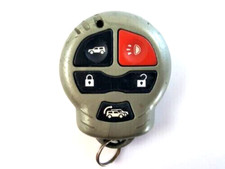 Auto Command Design Tech Keyless Remote Entry Transmitter Fob FCC ID: ELGTX7$31.86
 Auto Command Design Tech Keyless Remote 26671 Car Fob FCC ID ELGTX7 autocommand$35.07
 AUTO COMMAND DESIGN TECH KEYLESS ENTRY REMOTE CAR STARTER KEY FOB ELGTX7 clicker$25.98
 2x AUTO COMMAND DESIGN TECH KEYLESS ENTRY REMOTE START FOB TRANSMITTER ELGTX7$9.99
 NEW AUTO COMMAND ELGTX4B FOB REMOTE START KEYLESS ENTRY KEYFOB Design Tech 28861$16.95
 Remote Start Design Auto Command Remote Control Car Starter 25523 New In Box$36.99
 Vintage Design Tech Auto Command Remote Car Starter for 1996 to 98 Ford taurus$22.00
 www.userbars.org














