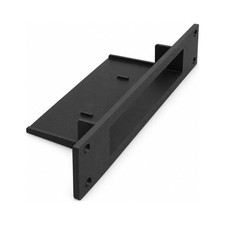
10 Inch Network Switch Rack Mount Compatible with Netgear GS308EP
- FREE YOUR DESK — Stop giving your network switch its own spot on your desk: this rack mount holds it inside your server rack instead of on a separate surface. Your switch joins the rest of your rack-mounted equipment, leaving that surface clear for your laptop, notes, or other work rather than making you find another corner of the table every time you rearrange your setup at home.
- 10-INCH RACK FIT — Check that your server rack uses the 10-inch format before you plan your installation, so your network switch has a place in the setup you are building. This plastic part fits 10-inch rack systems for home-lab installations and equipment organization, letting you use that rack format for your switch as well as your other gear; mounting hardware is not included.
- SNUG REAR SEATING — Give your network switch a close-fitting seat as you put your rack together: it fits very snugly into this mount from the back. Plan access behind the mount as you arrange your equipment, so you have room to bring your switch in from the rear when you are putting together a home lab or changing the layout of an existing equipment rack.
- CONNECTIONS STAY ACCESSIBLE — Plug and unplug connections on your network switch while it is fitted in the mount, keeping connection changes part of working at your rack rather than a reason to move your switch to the table. Whether you are reconnecting a cable after a layout change or disconnecting one during a network check, you work with your switch where you use it, alongside your other equipment.
- KEEP YOUR SWITCH — Bring your network switch into a rack-based setup without making a change of switch part of the project: this mount gives it a place inside your equipment rack. Whether you are building your first home lab or moving an existing network off a table, you keep working with your familiar switch and connections while making the rack the center of your network equipment. WHAT\'S IN THE BOX — Only the item named in the title. No hardware is included (see the description).
Your network switch is sitting on the table while the rest of your equipment is in the rack. Each time you rearrange your home lab, you still need a separate spot for it.
This network switch rack mount brings your switch into a 10-inch server rack, putting it alongside your other rack-mounted equipment instead of on a desk or another surface. It is a plastic part made to fit your network switch and the 10-inch rack format, so your switch becomes part of the rack-based setup you are building. Check your rack format before planning the installation, whether you are assembling a home lab or reorganizing equipment you already use.
Your network switch fits into the mount from the back with a very snug fit. Keep that rear entry in mind as you arrange your rack: leave yourself access to bring your switch into the mount from behind. Once your switch is fitted, plug and unplug its connections right there in the rack. Reconnecting a cable or changing a connection does not mean returning your switch to the table.
For home-lab owners and anyone organizing network equipment, this mount is a way to keep using a familiar network switch while changing where it lives. Use it when you put together your first rack, move equipment off your work surface, or bring an existing setup into a rack. Your switch gets its place with the rest of your network equipment, and your desk is left for the things you actually work on. When it is time to make a connection change, you return to the rack rather than to a separate spot elsewhere in the room.
HARDWARE NOT INCLUDED: Only the item named in the title is in the box. Every setup is different: depending on yours, mounting it or attaching it to an existing part may use hardware you already have, such as the original screws, or you may need to buy your own screws, bolts, tape or adhesive to suit your situation. No hardware of any kind is included with this listing.
When you click on links to various merchants on this site and make a purchase, this can result in this site earning a commission. Affiliate programs and affiliations include, but are not limited to, the eBay Partner Network.

 10" Inch Network Rack Mount Netgear GS308 / GS308E Network Switch 3d Print Petg$14.44
 10 Inch Network Switch Rack Mount Compatible with Netgear GS308EP, Black$31.99
 10-inch Network Rack Mount for Cloud Gateway Ultra UCG-Ultra and UXG-Max$49.99
 10 Inch Network Rack Mount Compatible with NETGEAR GS308E – Snug Switch, Black$23.99
 10 Inch 1U Network Rack Mount for TP-Link TL-SG108PE 8 Port Switch w Keystones$17.99
 VEVOR 6U Network Rack 7.87 Inch Depth Open Frame Server Rack for 10 Inch Network$56.90
 10 Inch Network Rack Mount 1U Netgear GS308 GS308E GS108 GS308EP GS305EP MS305$16.99
 10-inch Network Rack Mount for Ubiquiti Flex 2.5G Switch, Front Cable Management$35.99
 www.userbars.org














