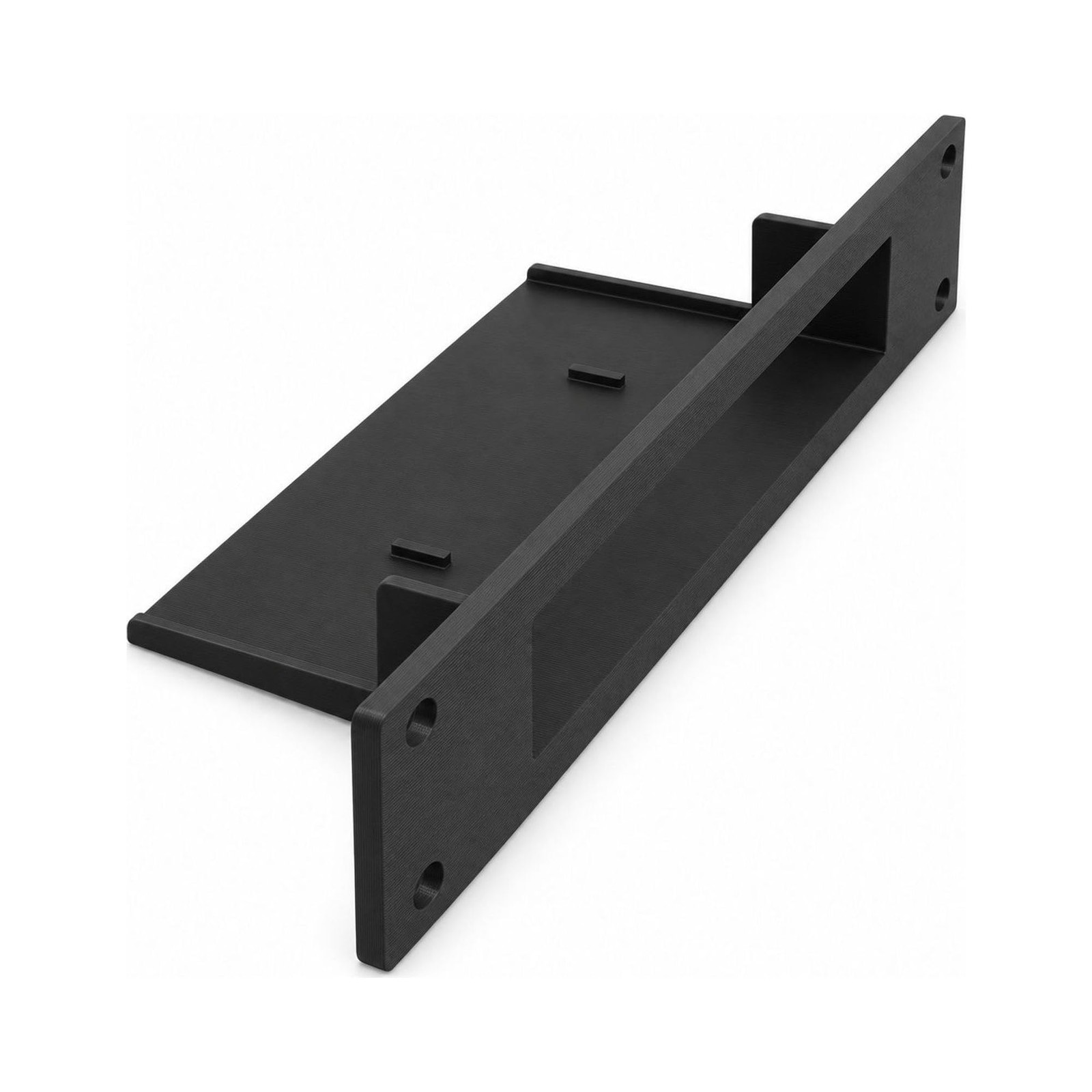
10 Inch Network Rack Mount Compatible with NETGEAR GS308E – Snug Switch Hold
- FREE YOUR DESK — Your network switch needs a place to sit, but that does not have to be the desk where you work or a separate shelf beside your equipment. Move it into your rack with this mount and keep that surface open for your laptop, paperwork, or the next job, while your network switch sits alongside your other rack-mounted equipment instead of taking up its own spot outside the rack.
- MATCH YOUR RACK — Check that your network rack is the specified 10-inch size before planning your layout, then give your network switch a place alongside your other rack-mounted gear. Whether you are arranging a home network or organizing equipment at work, this mount puts your switch into the rack you are building around, so you can plan its position as part of the setup rather than finding another surface.
- A CLOSE FIT — Give your network switch a snug place in your rack, with a mount that holds it closely rather than simply leaving it resting on a shelf. The durable thermoplastic construction makes this a plastic part for your equipment layout, and its close fit gives your switch a defined home when you arrange the rack at your workplace or put your home network equipment in order.
- SCREWLESS SWITCH FIT — Secure your network switch in the mount without screws between the two, so seating it in its holder does not mean fastening the switch itself down while you bring your equipment together in the rack. You get the plastic part only and supply the mounting hardware for rack installation; mounting hardware is not included, so plan for that separately from the screwless switch fit.
- PREPARE BEFORE FITTING — Remove the plastic feet from your network switch before installing it in the mount; that preparation is required for the snug fit. Make this part of your setup before you put your equipment in place, so you are ready to seat your network switch in its rack holder rather than interrupting the job to take the feet off after you have started arranging the rest of your rack. WHAT\'S IN THE BOX — Only the item named in the title. No hardware is included (see the description).
Your network switch needs a home, but your working desk does not have to be it. Leaving it on a separate shelf also spreads your network equipment beyond the rack where you want it together.
The SplashNColor 10-inch network rack mount moves your network switch into your rack, alongside your other rack-mounted equipment. It gives that part of your network its own place without using the desk space you need for your laptop, paperwork, or the next task. Check that your rack is the specified 10-inch size as you plan where your switch will sit.
The mount holds your network switch snugly, with no screws securing the switch to the mount. That distinction matters when you prepare your setup: the screwless connection is between your switch and its holder, while rack installation still requires mounting hardware that you supply. You can plan both steps before you start arranging your equipment.
Before fitting your network switch, remove its plastic feet. This preparation is required before installation, so take care of it before seating the switch in the mount. The durable thermoplastic part then gives your switch a close-fitting place in the rack rather than another spot on a nearby surface.
For someone organizing a home network or installing equipment in a workplace, the benefit is straightforward: your network switch belongs with the rest of your rack-mounted gear. Use the mount when putting together your setup or moving equipment off a desk and into your 10-inch rack. Your working surface stays available for work, and your network equipment stays together in the layout you chose.
HARDWARE NOT INCLUDED: Only the item named in the title is in the box. Every setup is different: depending on yours, mounting it or attaching it to an existing part may use hardware you already have, such as the original screws, or you may need to buy your own screws, bolts, tape or adhesive to suit your situation. No hardware of any kind is included with this listing.
When you click on links to various merchants on this site and make a purchase, this can result in this site earning a commission. Affiliate programs and affiliations include, but are not limited to, the eBay Partner Network.

 10" Inch Network Rack Mount Netgear GS308 / GS308E Network Switch 3d Print Petg$14.44
 10 Inch Network Rack Mount Compatible with NETGEAR GS308E – Snug Switch, Black$23.99
 10-inch Network Rack Mount for Cloud Gateway Ultra UCG-Ultra and UXG-Max$49.99
 10 Inch Network Switch Rack Mount Bracket – Compatible with TP-Link, Black$23.99
 10 Inch 1U Network Rack Mount for TP-Link TL-SG108PE 8 Port Switch w Keystones$17.99
 Space-Saving 6U 10 Inch Network Rack - Ideal for Home and Professional Use$135.97
 10-inch Network Rack Mount for Ubiquiti Flex 2.5G Switch, Front Cable Management$35.99
 10-Inch Network Switch Rack Mount for Ubiquiti Unifi USW-Flex-Mini 2.5G 5, Black$24.99
 www.userbars.org