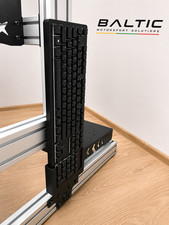
Sim Racing Keyboard Holster Compatible with Logitech K400
- CLEAR YOUR COCKPIT — When your keyboard is loose beside your seat or taking up a surface you need for other gear, give it a home near the driving area. This sim racing holster holds your keyboard when you are not typing, keeping it off other surfaces and within reach so you move between driving and keyboard input without hunting around your cockpit between sessions.
- BUILD INTO YOUR FRAME — Work your keyboard storage into your custom cockpit instead of planning another surface around it, with a mount made for aluminum-extrusion simulator frames and DIY gaming builds. Fit it to your aluminum-profile frame as you arrange the space around your controls; you get the plastic part only, and mounting hardware is not included.
- CHECK YOUR KEYBOARD FIT — Measure your keyboard against the supported limits of 140 mm wide x 20 mm thick before you plan its place beside your controls. Intended for selected wireless keyboards, this holster gives your keyboard a place to go between typing tasks, so the cordless setup you chose for your cockpit also has a home when your hands return to the main controls.
- ROOM FOR FLIGHT CONTROLS — When your flight simulation setup leaves little space for a keyboard, keep it in a holster instead of laying it across another surface. Use it on an aluminum-profile simulator frame to keep your keyboard available for input between stretches at the flight controls, giving your setup a clear place for the keyboard you still need without occupying another surface around you.
- MORE ROOM TO GAME — Use your keyboard for a menu or a quick entry, then put it back instead of leaving it across another surface at your PC gaming station. On an aluminum-profile setup, the holster gives your keyboard a regular home when the main controls take over, keeping keyboard access part of your station without making keyboard storage the center of the space where you settle in for a game. WHAT\'S IN THE BOX — Only the item named in the title. No hardware is included (see the description).
Your keyboard needs to stay close, but the space around your simulator controls is already busy. Leaving it loose or borrowing another surface makes switching back to typing a distraction.
The SplashNColor keyboard holster gives your keyboard a home near the driving area of your sim racing cockpit. It holds your keyboard when you are not typing, keeping it off other surfaces and ready for the next input. This aftermarket accessory is a plastic part made for aluminum-extrusion simulator frames, so keyboard storage becomes part of your cockpit layout rather than another thing to find room for beside it.
Work it into your custom simulator cockpit or DIY gaming build as you plan the space around your controls. The holster fits to an aluminum-profile frame and supports selected wireless keyboards. Before ordering, measure your keyboard against the supported limits of 140 mm wide x 20 mm thick. These are keyboard fit measurements, not the outside dimensions of the holster, and they do not mean every wireless keyboard within those limits fits.
For simulator users and PC gamers, a dedicated keyboard spot matters most when the main controls fill the area in front of you. Keep your keyboard nearby during a race, give it a home alongside your flight simulation controls, or work it into an aluminum-profile PC gaming station. Use your keyboard when you need to make an entry, then return it to the holster before going back to the controls. You spend your session using the setup you built, rather than looking for somewhere to put your keyboard each time you finish typing.
HARDWARE NOT INCLUDED: Only the item named in the title is in the box. Every setup is different: depending on yours, mounting it or attaching it to an existing part may use hardware you already have, such as the original screws, or you may need to buy your own screws, bolts, tape or adhesive to suit your situation. No hardware of any kind is included with this listing.
When you click on links to various merchants on this site and make a purchase, this can result in this site earning a commission. Affiliate programs and affiliations include, but are not limited to, the eBay Partner Network.

 Sim Racing Keyboard Holder for Trak Racer TRX V2 & Logitech K400 Plus Kerbforge$39.95
 Sim Racing Button Box & Keyboard Stickers/Decals/Lavels for iRacing$9.99
 Sim Racing Accessories – Adjustable Keyboard Mount for 40x40 / 80x40 Rig, Black$34.99
 Sim Racing Accessories Keyboard Storage Mount – Compatible with Logitech, Black$23.99
 Sim Racing Keyboard Holster Compatible with Logitech K400, Black$20.99
 Supllueer Mobile Keyboard Tray and Mouse Pad Trolley For Racing Sim Cockpit$89.99
 Sim Racing Accessories – USB Mini Keyboard/Mouse Holder for 4040/4080, White$17.99
 Sim Racing Rig Keyboard Holder For Racing Cockpit Setups$23.81
 www.userbars.org














