Installation
However, if the ignition system has a low voltage rev counter signal output, it will work perfectly.
Position the unit on the dashboard where the lights can easily be seen. Feed the wire through to the rev counter and connect as follows:
Red wire – ignition switched power or battery positive (+12V)
Black wire – earth (-)
Blue wire –RPM signal from ECU or standard tachometer.
SL15 Shift light Setup
1. Switch on the ignition, but do not start the engine. Upon power up, after 1s the display will show ‘0000’ to indicate standby mode.
2. Press the button to enter setup mode. Once pressed, each parameter will be sequentially configurable: if no change is done by pressing the button for 3 seconds, the next parameter will be displayed for modification. The parameter order is the following: redline shift point, begin of led lighting rev point, number of pulses, display brightness, LED brightness, LED scrolling mode.
3. Shift point: Hardware default is 4000. Pressing button will increment shifting point by 100 rpm. Once desired value is obtained, wait for the software to switch to next parameter. Note: For values from 10k to 15k rpm the display will show 100 to 150.
4. Begin of led lighting rev point: Hardware default is 100. Pressing button will increment point by 100 rpm up to shift point. Once desired value is obtained, wait for the software to switch to next parameter.
5. Number of pulses: Default is 2, value displayed is 20. Each button press will add 0,5 or 5 on display (20, 25, 30 for 2, 2,5, 3, etc.). Once desired value is obtained, wait for the software to switch to next parameter.
6. LED brightness: Pressing button will toggle between 3 LED brightness intensities. Once desired brightness is obtained, wait for the software to switch to next parameter.
7. LED scrolling mode: Each time software is entering into the setup loop, it will change the scrolling mode (single led or accumulative display). Then, if only LED scrolling mode change is desired, one will only have to enter Setup and wait for the SL15 to return to normal mode.
When you click on links to various merchants on this site and make a purchase, this can result in this site earning a commission. Affiliate programs and affiliations include, but are not limited to, the eBay Partner Network.

 RGT race tech SL15 OLED sequential shift light digital tachometer$89.00
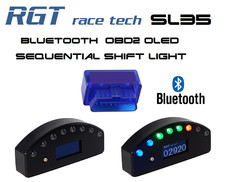 SL35 RGT race tech Bluetooth OBD2 Sequential Shift light shiftlight OLED$89.00
 SL45 RGT race tech OBD2 Seq. Shift light coolant temperature gauge alarm speedo$99.00
 www.userbars.org














