One (1)
Aftermarket remote keyless entry fob alarm
Transmitter control clicker keyfob controllerreplacement
Functionsat 100% Tested & Guaranteed
FCC ID: EZSDEI474P EZSDE1474
PART NUMBER: 474P 474V 474L
OTHER REPLACEMENTS: 473V 473P 473L
BOARD#: DTBG
FREQUENCY: 433Mhz
LED COLOR: GREEN
4 BUTTONS
COMPATIBLE W/ THE FOLLOWING SYSTEMS:
Avital
21000
2200
4000
4100
4200
4300
4400
Python
440 HP
460 HP
660 XP
Sidewinder
381S
3200 HS
3300 HS
5500 XS
Valet
562T1R
562T
712T
716T
Hornet
740
742
Rattler
110D
210D
310D
369D
Viper
210 HV
350 HV
650 XV
850 XV
PROGRAMMING THESE REMOTE(S)
o 1 Open your driver's side door and get into the vehicle. Leave the door open. Put your key into the ignition and turn it to the "On" position.
o 2 Push the "Valet" button on the remote one time to program your alarm, two times to program the trunk release and door locks, and three times to program the remote starter.
o 3 Listen for one, two or three chirps from the system, according to which function you are programming from the previous step.
o 4 Push and hold the "Valet" button and then push the button for the feature you want to program.
o 5 Listen for one, two, or three chirps to confirm programming. Press the "Valet" button to exit programming mode. Turn your ignition key to the "Off" position.
OR
1) Open a door and make sure the dome light is on.
2) Turn the ignition on to the RUN position or you may also start car.
3) Within 15 seconds press and release the push button
to select the channel you wish to program. For example, press and release
once for channel 1 (arm/disarm channel). For Channel 2, press and release twice (trunk release). For Channel 3, press and release three times (remote start). (Some systems require different programming for different channels. You can get specific installation manuals with remote programming instruction )
Press and hold the push button once more. You should get a
confirmation chirp/horn-honk or a flashing LED light (If installed).
If you do not get a chirp/horn-honk the alarm may have a jumper in
the alarm that has the programming feature turned OFF (disabled).
4) Once the alarm chirps/horn-honks keep holding the push button.
5) Press the button on the transmitter that you would like to control the selected receiver
channel. A chirp/horn-honk will confirm that the code has been learned. If programming
more than one transmitter repeat step 5. Old transmitter codes will be dropped only
if programming 4 new transmitters.
6) Once the code(s) are learned, the push button can be released.
Learn Routine will be Exited if:
Ignition is turned off
Door is closed
push button is pressed too many times
More than 15 seconds elapses between steps
One long chirp/horn-honk indicates that Learn Routine has been exited.
100% Guarantee Remote Shipping / Return Policy
Yes. Itwill have a working battery installed.
Your vehicle will be installed with one of thefollowing keyless entry systems:
The above information can change which remote youneed
for your installed remote keyless system.

When you click on links to various merchants on this site and make a purchase, this can result in this site earning a commission. Affiliate programs and affiliations include, but are not limited to, the eBay Partner Network.

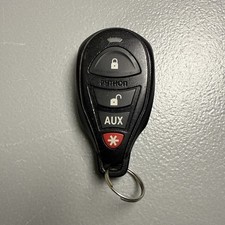 Python Keyless Remote Transmitter Key Fob Alarm Aftermarket FCC ID: EZSDEI7141$16.00
 Python aftermarket keyless entry remote start starter controller transmitter fob$29.36
 2 Remote For Python Aftermarket Keyless Entry Car Key Fob Control EZSDEI474P$49.95
 Fits Python Aftermarket Keyless Entry Car Key Fob Control EZSDEI474P$25.95
 PYTHON REMOTE AFTERMARKET KEYLESS ENTRY REMOTE 4-BUTTON FCC: EZSDEI7141 GOOD$10.95
 Python Aftermarket Keyless Remote Car Start Key Fob Entry EZSDEI475 No Ring$31.49
 Remote For Python Aftermarket Keyless Entry Car Key Fob Control EZSDEI474P$25.95
 Python Aftermarket Keyless Remote Start Key Fob EZSDEI7211 1 Button RPN 7211P$89.99
 www.userbars.org













