This item is pre-owned – it will work like newonce programmed to your vehicle
One (1)
Aftermarket remote keyless entry fob alarm
Transmitter control clicker keyfob controllerreplacement
Functions at 100% Tested & Guaranteed
Directed Electronics Inc. (DEI)
Viper / Clifford / Python
FCC ID: EZSDEI7152A
( Alternate spellings: EZSDE17152A )
Interchangeable FCC ID #s:
EZSDEI7152
EZSDEI7152A
Part #: 7154P
Interchangeable Part #s:
7154
7154X
7154P
7154V
Frequency: 433 – 434 MHz (433.92)
LED color: Orange
5 buttons
Please Note:
A Valet / Programming switch is required to program this remote.
Programming can be difficult if you are not familiar with it. Please read the programming instructions (below) before purchasing. Assistance from an auto specialty shop or locksmith may be needed.
What you will receive NEW:
- 7154P 1-Way Remote Control
- Programming Instructions
Works with the following Python systems
- 323
- 333
- 414
- 424
- 514
- 524
- 580
- 872
- 1401
- 1601
- 3203P
- 3303P
- 4102P
- 4104P
- 4106P
- 4108P
- 4202P
- 4204P
- 4206P
- 4208P
- 5102P
- 5104P
- 5106P
- 5202P
- 5204P
- 5206P
- 9153P
- 4X10*
- 5X10*
*Requires Antenna 6111T or 6211T
Programming Your Remote Control
Note:Make sure the system is disarmed, and the Control Center (windshield mounted antenna) LED is completely OFF for a minimum of 60-seconds prior to beginning the remote pairing process.
Preparing the system
- Open drivers door
- Turn the ignition ON.
- Within 10-seconds, press and release once, then press and hold the system’s Control Center (The Windshield Mounted Antenna)Valet button. The status LED begins flashing and the siren/horn (if connected) sounds to confirm the system is ready for pairing.
- Release the Control Center\'s Valet button.
Pairing the remote control
- Press and hold the \"f\" button (approximately 8-seconds)
- Wait for the Transmit LED to light solid and the remote to beep. Release the \"f\" button
- Press the \"REMOTE START\" button for 1 second. The transmit LED will blink 3 times and beep 3 times.
- Within 5 seconds, press the \"LOCK\" button. The vehicle horn will honk. You have now successfully learned the remote to the vehicle remote start and keyless entry system.
- Press the \"f\" button two times to exit learn routine on the remote. The transmit LED will turn off and exit tone will sound.
- Turn the ignition OFF and WAIT approximately 60 seconds.
Note:2-Way remotes will emit tones and provide visual confirmation that the remote has successfully paired with the system. 1-Way remotes do not offer pairing confirmation.
100% Guarantee Remote Shipping / Return Policy
1. We have a 30 dayreturn policy.
2. All returns forreplacements and refund need an RMA #.
3. Please contact usbefore returning items so we can give you theRMA # and the proper returnaddress.
4. No refunds / replacementswill be granted without an RMA#
Weensure proper working condition of all previously used or new remotes through aserious of tests performed with the Santronics Testing device. Each button istested for functionality prior to shipment and then logged.
Yes. It will have a working battery installed.
Battery Condition:
Your vehicle will be installedwith one of the following keyless entry systems:
The above information can changewhich remote you need
for your installed remote keyless system.
When you click on links to various merchants on this site and make a purchase, this can result in this site earning a commission. Affiliate programs and affiliations include, but are not limited to, the eBay Partner Network.

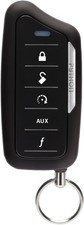 Python 7154P 1-Way 5 Button Remote compatible with VIPER 7153v & Clifford 7153x$39.89
 Python 7154p Replacement Remote Transmitter New$49.99
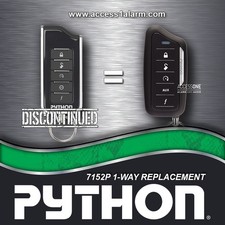 Python 7152P 1-Way 5-Button Remote Control For 580 4202P New 7154P EZSDEI7152A$59.99
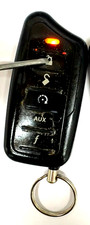 Python 7154P 1-Way 5b Keyless Remote Control Car Starter Transmitter EZSDEI7152A$29.55
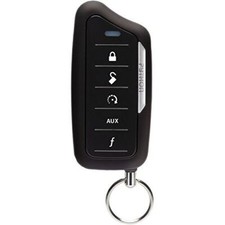 Directed Electronics Python 7154P Supercode 1-Way 5 Button Remote LE Companion$34.99
 Python 7153P 1-Way 5-Button Remote Control For 333 3303P New 7154P EZSDEI7153$59.99
 Python 7154P 1-Way 5-Button Remote Control Replacement Transmitter EZSDEI7153$59.99
 Python 7153P 1-Way 5-Button Remote Control For 414 4104P New 7154P EZSDEI7153$59.99
 www.userbars.org














