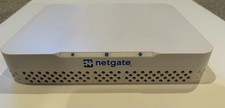
Netgate SG-1100 security gateway with pfSense Plus. Wiped and freshly reinstalled with pfSense Plus 26.07, so it’s set up with factory defaults and none of my config is on it.
Tested after the reinstall: boots fully, LAN port hands out an address, and the web login page loads at 192.168.1.1. The WAN port connected to the internet during the install.
Good for: home labs, VLANs and custom firewall rules, multi-WAN failover, VPN (WireGuard/OpenVPN), pfBlocker-style ad and malware blocking, and small networks up to about gigabit. Low power (about 3.5 W idle) and completely silent.
Not for: people who want a plain plug-and-play WiFi router. It’s wired only, so you’ll need a separate access point. Its dual-core ARM CPU won’t handle multi-gig connections, and VPN or heavy packages will lower throughput. Netgate rates it at up to about 900 Mbps routing.
Specs: dual-core ARM Cortex-A53, 1 GB RAM, 8 GB eMMC, 3x Gigabit Ethernet (WAN/LAN/OPT), USB 3.0 and 2.0, micro-USB console port.
Setup:
- Modem into the WAN port, your PC (or switch or access point) into the LAN port.
- Plug in the 12V power. First boot took about 5 minutes for me and the lights blink the whole time, so wait until they stop blinking before you try the web page.
- Browse to https://192.168.1.1 (accept the certificate warning).
- Login: admin / pfsense. You’ll be prompted to set a new password, and the setup wizard walks you through the rest.
Tip: some cable modems need a power-cycle to recognize a new device.
Ships in original box with PSU and loader cable.
When you click on links to various merchants on this site and make a purchase, this can result in this site earning a commission. Affiliate programs and affiliations include, but are not limited to, the eBay Partner Network.

 Netgate SG-1100 pfSense Plus Firewall Router$99.00
 OPNsense pfSense 16-Core Atom C3958 16GB ECC RAM 512GB SSD 8-Port QAT AES-NI VPN$298.00
 Netgate SG-5100 pfSense Plus Firewall Router | Latest 26.03.1 | PSU Included$349.99
 NETGATE 1100 PFSENSE+ SECURITY GATEWAY$245.00
 Netgate SG-1100 pfSense Plus Firewall Router, Factory Reset.$122.00
 Netgate 4200 pfSense Plus 26.07 Firewall w/4gb RAM and 200gb+ NVME SSD$575.00
 Netgate 4200 MAX pfSense+ Firewall Router Appliance$599.00
 Netgate 6100 BASE pfSense+ Firewall Router 10GbE SFP+ 2.5GbE - Factory Reset$699.00
 www.userbars.org













