|
>> If you dont know how to design a userbar, then write here a Userbar that you want.
>> If you know how to design them help these people and design what they request.
|
 |
|
USERBARS.org | Free Forum Userbars
| On eBay now |

Honda Racing Wing Racing 6" Die Cut Team Sticker Motocross Decal Motorcycle art
$5.95

The Honda Racing Wing 6" or 10" Die Cut Team Sticker is a black vinyl decal featuring a motocross theme with wings. Suitable for motorcycles, vans, cars, caravans, and trailers, this self-adhesive sticker can be placed on various parts of the vehicle including bumpers, rear windows, front doors, and more. With universal fitment, this decal is a great way to show off your Honda brand pride while adding a unique and eye-catching touch to your ride. Proudly made in the United States, this sticker is a must-have for any motocross enthusiast. Instructions: Prepare the Surface: - Ensure the surface where you plan to apply the sticker is clean and dry.
- If needed, use a mild cleaning solution to remove any dust, dirt, or grease. Allow the surface to dry completely.
Gather Tools: - Have a credit card, squeegee, or any flat, smooth object on hand. This will be used to smooth out the sticker and remove air bubbles.
Peel the Backing: - Turn the sticker over so that the adhesive side is facing up.
- Gently peel back a small portion of the backing, exposing the adhesive side of the sticker.
Position the Sticker: - Carefully place the exposed adhesive side of the sticker onto the desired location on the surface.
- Align it according to your preference, making sure it's straight and in the desired position.
Apply the Sticker: - Once the sticker is positioned, use the credit card or squeegee to smooth out the sticker from the center to the edges.
- Apply even pressure to ensure good adhesion and to remove any air bubbles.
- Smooth Out Any Bubbles:
- If you notice any air bubbles, use the credit card or squeegee to gently push them toward the edges of the sticker, allowing them to escape.
Final Check: - Carefully inspect the sticker to ensure it's securely adhered to the surface with no bubbles or wrinkles.
Let It Set: - Allow the sticker to set and adhere to the surface for at least 24 hours before exposing it to extreme conditions, such as water
Following these steps should result in a well-applied die-cut sticker. Remember to take your time and be patient during the process to achieve the best results. All Sticker orders that do not choose an upgraded service will ship with the USPS Standard Envelope. This is a first class mail option with limited tracking. Tracking updates come from automated scans as the envelope moves through USPS sorting facilities (no manual scans at drop-off or delivery). It often shows "Delivered" when it reaches your local post office, with actual arrival in your mailbox typically within 1-5 days after that. We make and ship 99% of our orders the next business day. Once the USPS has the envelope it's something that we have no control over. Most envelopes make it to there destination in a reasonable amount of time. IF YOU NEED YOUR STICKER FAST, YOU SHOULD CHOOSE TO UPGRADE THE SHIPPING. WITH USPS ADVANTAGE YOU GET REGULAR TRACKING AND FASTER SERVICE.
When you click on links to various merchants on this site and make a purchase, this can result in this site earning a commission. Affiliate programs and affiliations include, but are not limited to, the eBay Partner Network.
|
|
|
|
|
|

 Honda Racing Wing Racing 6" Die Cut Team Sticker Motocross Decal Motorcycle art$6.95
 For Honda Civic 46" Black Rear Trunk Spoiler Racing GT Wing Adjustable$141.68
 For Honda Accord LX 46" Rear Trunk Spoiler Wing GT Style Racing Matte Black$85.49
 For Honda Civic 2016-2021 Black 46"GT Style Racing Rear Trunk Spoiler Wing Lip$94.99
 59'' PRO GT Style Trunk Rear Spoiler Racing Wing Glossy For Honda Civic Type R$165.05
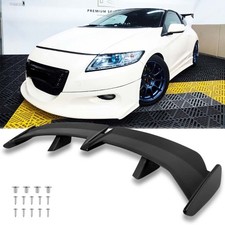 54" Rear Trunk Spoiler Racing Wing Lip Racing Matte Black For Honda CR-Z 2011-16$109.11
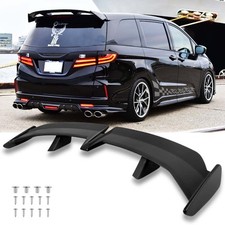 54" Rear Trunk Spoiler Racing Racing Wing Lip GT-Style Matte For Honda Odyssey$109.11
 For HONDA CIVIC 2-Door Coupe 47" Glossy Rear Trunk Spoiler Racing Wing GT Style$95.05












