Keydial RemoteEfficiency, All in One-Hand Control
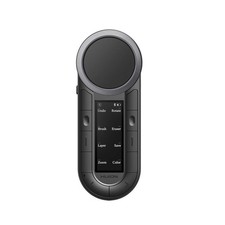
Huion Keydial Remote features a dual-dial controller and eight programmable keys. It can be connected to two devices via Bluetooth and supports customizing shortcuts. The ergonomic design offers a comfortable grip for immersive creation.
Your Reliable AssistantDigital Drawing
Quickly adjust brushes and canvas, enhancing drawing efficiency.
Video Editing
Freely and precisely control the timeline and volume.
3D Modeling
Use various tools to fine-tune your models with ease.
Note-Taking
Switch between writing tools to create richer notes.
Photo Editing
Use the dial controller to quickly adjust parameters.
Office Work
Your frequently used shortcuts are all included.
Inner Circle, Outer Ring
The dial controller, located on the top of the Huion Keydial Remote, is comprised of an inner circle and an outer ring, enabling quick access to two different functions with one hand.
Inner Circle
Featuring a large operation surface, the inner circle allows for smooth rotation, making it suitable for zooming the canvas, scrolling, and adjusting volume.
Outer Ring
Adorned with Clous de Paris patterns, the outer ring provides precise adjustments for canvas rotation, brush size control, parameter sliding, and frame-by-frame adjustments with comfort.
6 Group Functions to
Enhance Your Workflow.
Huion Keydial Remote is equipped with 8 programmable keys*, each assignable to 6 groups of functions, expanding the total number of key functions to 48 and dial functions to 12. Additionally, you can rename the groups for easy access to different function, and quickly switch between them using the 2 group keys.
48
Key Functions
12
Dial Functions
6
Groups
2
Switch Keys
*The keys are made of plastic and rubber materials, featuring short travel for a responsive feel.
Forget Stickers,
All Functions Show On
Huion Keydial Remote features an OLED screen that displays all press key functions without the need to memorize them. This greatly reduces the learning curve and improves efficiency.
Additionally, the screen shows the current group, battery level, connection status, and sleep mode, giving you a clear overview of your device.
Current Group
Connection Status
Key Functions
Battery Level
Wireless For Multi-Devices
Huion Keydial Remote features dual Bluetooth channels, allowing simultaneous connections to two wireless devices. Switch between devices with a simple click of the side key. Plus, each Bluetooth channel stores its own settings, ensuring your key configurations remain intact even when switching between devices.
30 Hours
Continuous Use
2.5 Hours
Fast Charging
*K40 also includes a wired connection channel. When connected via wire, Bluetooth automatically disconnects. However, during charging, the wireless connection remains active.
PC, Pad, Phone,
All Programmable
Keydial Remote is compatible with common operating systems and comes with an application to help you customize its functions easily.
Huion Driver
Huion Keydial
For PC
[windows + macOS]
You can use the Huion driver to customize various functions, including key combinations, mouse buttons, modifier keys, volume controls, and more. It also supports mapping different functions for specific software, taking productivity to the next level.
For Mobile
[iPadOS + iOS + Android]
The Keydial App has been updated for mobile devices, allowing you to set up key combinations and functions. Additionally, the app includes multiple software presets, making it easier to use.
*Mobile functionality relies on key values; compatibility depends on software support.
*Currently, multi-software adaptation is not supported on mobile.
*Only Bluetooth connectivity is supported on mobile devices.Posture and Position, As You Prefer
Whether you\'re left-handed or right-handed, working at a desk or jotting down ideas in bed, Huion Keydial Remote always helps your workflow.
On the Table
Your perfect workflow assistant.
On the Display
Suitable for large pen displays.
In Your Hand
Ergonomic slope design for ultimate comfort.
In the Other Hand
Left-handed artist? We\'ve got you covered.
4-Way Rotation
Customize your setup your way.
In the Box
- Huion Keydial Remote×1
- Storage Bag×1
- USB-C to USB-A Cable×1
- Quick Start Guide×1
When you click on links to various merchants on this site and make a purchase, this can result in this site earning a commission. Affiliate programs and affiliations include, but are not limited to, the eBay Partner Network.

 HUION Keydial Mini Bluetooth Programmable Keypad with Dial 5 Keys 18 Customized$34.00
 HUION Keydial Remote Bluetooth Programmable Keypad Dual Dials 60 Keys K40$89.95
 HUION Keydial Mini Bluetooth Programmable Keypad with Dial 5 Keys $30.00
 HUION Keydial Remote Bluetooth Programmable Keypad Dual Dials 60 Customized Keys$94.99
 HUION Keydial Remote Bluetooth 5.0 Programmable Keypad OLED Display Macro Keypad$75.00
 HUION Keydial Mini Bluetooth Programmable Keypad 18 keys Certified Refurbished$36.00
 HUION Keydial Mini K20 Wireless Bluetooth Shortcut Keyboard Drawing Tablet Remot$64.99
 HUION Keydial Remote Bluetooth Programmable Keypad Dual Dials 60 Customized Keys$99.00
 www.userbars.org














