Product Feature:
1. The product is made of high-quality materials with guaranteed quality
2. The product is very suitable for DIY enthusiasts and electronic teaching, etc
3. Stable product performance and long service life
4. With multiple functions such as time display, temperature display, power-off saving function, adjustable time and time division, adjustable alarm clock, etc
5. With light control function, the brightness can be automatically adjusted according to the environment (also used as a small night light)
Product Description:
1. Time display, power-off saving function
2. Adjustable time and time division
3. Can display temperature
4. Adjustable alarm clock, alarm switch
5. Automatically adjust brightness on/off
6. Press S1 for the first time to enter the score adjustment mode, and at this time, press S2 to increase the score by 1
7. Press S1 for the second time to enter timing mode, and at this time, press S2 to add 1
8. Press S1 for the third time to enter the alarm clock adjustment mode. At this time, press S2 to increase the alarm clock adjustment by 1
9. Press S1 for the fourth time to enter the alarm clock timing mode. At this time, press S2 to increase the alarm clock timing by 1
10. Press S1 for the fifth time to enter the alarm switch. The default display is \"0000\", and the instant alarm is off. At this time, press S2 to display \"1111\", and the alarm is on
11. Press S1 for the sixth time to enter the automatic brightness adjustment mode switch, and the default display is \"0000\"
12. The automatic photometric adjustment function is turned off, and pressing S2 to display \"1111\" means automatic
13. Photometric adjustment function enabled
14. Press S1 for the seventh time to return to the main display screen
Shipping list:
DIY loose parts+Cable X1(with or without Shell)
Please Note:
Communication is the best way to solve the problem.Your satisfaction is our top priority. We appreciate your positive response!
We have always been committed to providing the best service and reliable products to every customer.
However, accidents may occur at times, and we understand your concerns and setbacks.
Please contact us to resolve the issue before leaving negative response.
We will reply to you as soon as possible. If there is no response within 24 hours, please check the email in your email.
Our goal is to provide first-class customer service, so we usually do our best to solve any problems!
(Note: Weekend Information Will Be Replied on the Next Working Day)
When you click on links to various merchants on this site and make a purchase, this can result in this site earning a commission. Affiliate programs and affiliations include, but are not limited to, the eBay Partner Network.

 DIY Rotating LED Alarm Electronic Digital Clock Kit Learning Board 5V DS1302$24.88
 DIY Rotating Led Ballet Girl Music Box Soldering Practice Kit$31.99
 DIY Biaxial Spherical Rotating LED Kit Creative for POV Soldering Training$43.06
 DIY Rotating LED Electronic Digital Clock Kit Learning Board DC5V DS1302 + SheH1$22.24
 LED Display DIY Kit 51 SCM Dual Color Rotating Welding Spare Parts3873$21.99
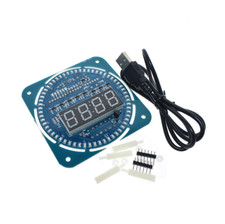 DS1302 Rotating Digital LED Display Module Alarm DIY Electronic Digital Clock $14.41
 2 Sets Rotating LED Flashing Light DIY Kit for Soldering Kit Practice Electronic$10.96
 Electronic LED Gyro DIY Welding Kit Rotating Lantern Inline Componenex Diy Kit$2.81
 www.userbars.org














