Control4 NEEO Remote Control – OS3 Compatible – NE-RMT – Black – Used, Great Condition
Control4 NEEO Remote Control – Black (NE-RMT)
OS3 Compatible
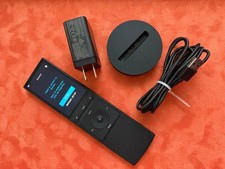
Up for sale is a used Control4 NEEO Remote Control in great working condition. The remote and base may show minor signs of normal use and very small scratches, but everything is in good working condition.
Please review all photos carefully. You will receive exactly what is pictured in the listing.
What Is Included
Control4 NEEO Remote Control – Black
NEEO Base/Charging Station, as pictured
US power/charging accessories shown in the photos
Please Note
No original box is included
No manual/instruction booklet is included
No international power plug attachments/adapters are included
You will receive only the items and accessories shown in the pictures
About the Screens Shown in the Photos
Some of the screens displayed in the photos are shown because the remotes have not been configured/connected to a Control4 system.
This is normal for an unconfigured NEEO remote. Once the remote is connected to your Wi-Fi and your existing Control4 system, it will connect to the system and download/configure the appropriate system information.
Basic Setup
For an existing Control4 OS3 system:
Turn on the NEEO remote and follow the on-screen setup instructions.
Connect the remote to your Wi-Fi network.
Make sure your Control4 system is powered on and connected to the same network.
The NEEO remote should locate/connect to your Control4 system.
Once connected, it will synchronize with your Control4 system and display the appropriate devices and controls.
Important: The exact setup process can depend on your Control4 system configuration and controller.
Condition
The remote and base are used but in good working condition. They may have minor cosmetic signs of use, including very small scratches, but nothing that affects normal operation.
Please look at all photos carefully, as the photos are part of the description. What you see is exactly what you will receive.
Thank you for looking, and please feel free to ask any questions before purchasing.
When you click on links to various merchants on this site and make a purchase, this can result in this site earning a commission. Affiliate programs and affiliations include, but are not limited to, the eBay Partner Network.

 Control4 NEEO Remote Control - OS3 COMPATIBLE - NE-RMT - BLACK - USED$159.00
 New Control4 NEEO Smart Remote NE-RMT-BL (Black) y481$422.49
 Control 4 Neeo Smart Remote WiFi Bluetooth, Black, NE-RMT + Charging Cradle$202.50
 Bright Screen Control4 C4-SR260 Remote Control AA Version$194.99
 Control4 NEEO Remote Control - OS3 COMPATIBLE - NE-RMT - BLACK - USED$149.99
 Control4 NEEO Remote Control - OS3 COMPATIBLE - NE-RMT - BLACK - USED$212.00
 Control4 NEEO Remote Control - OS3 COMPATIBLE - NE-RMT - BLACK - USED FAIR$100.00
 NEEO Control4 NE-RMT Home Remote Model RM6333601 w/Charging Base USB Cable Works$189.99
 www.userbars.org














