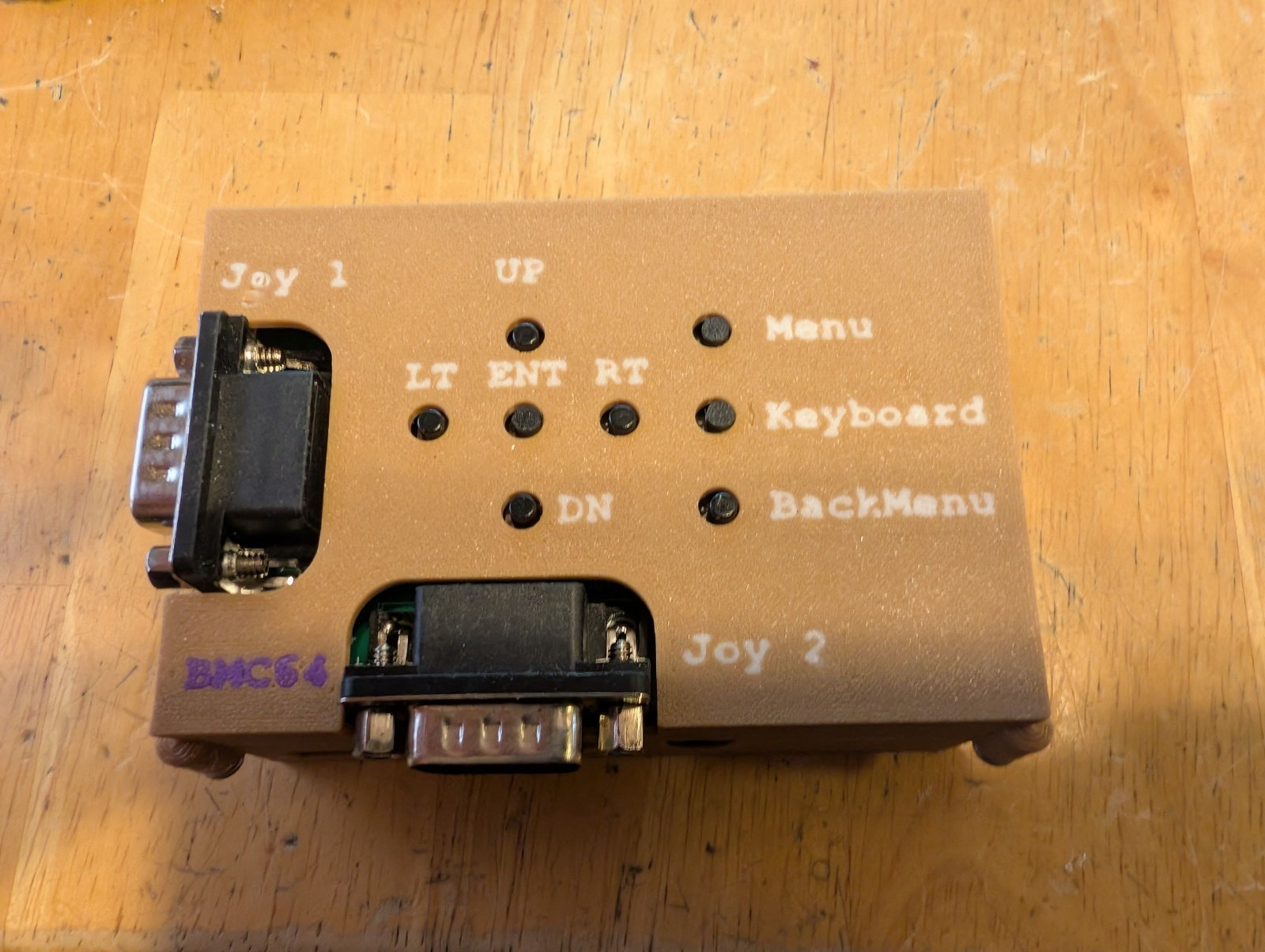
BMC64 IO Hat for Raspberry Pi with Raspberry PI 3B w/case Commodore BMC64
$55.00

You are buying a BMC64 IO Hat for Raspberry Pi with Raspberry PI 3B w/case for Commodore BMC64 project.
Raspberry PI 3B included. Micro SD included. IO Hat included. BMC64 installed.
This has been assembled and tested.Although I can\'t provide any links, you can go to pcbway and search forBMC64 IO Hat for Raspberry Pi
You can also search forRandy Rossi for the BMC64 Project.This is not my project. I offer no Support.From the designer description:With this project, you can do almost everything you can do with a complete Commodore 64 computer Kit. C64 + disk drive + data tape cassette player + many cartridges... can be emulated.Other than this, you need:1) An adapter suitable for your Raspberry Pi model 3B. Micro USB 5V/2.5A.2) HDMI television connection cable.3) 9-Pin Commodore64 compatible joystick for gaming. (better if there are two)
BMC64 IO Hat for Raspberry PiDesigned the IO Hat to work with the BMC64 v3.5 Raspberry Pi Bare Metal Emulator which when coupled with a Raspberry Pi gives a fully functional Commodore 64, 128, Plus4, Vic20 & PET computer in a small portable box with HDMI out.
Two joystick ports allow for the full retro experience and if just playing games the keyboard is replaced with a virtual on screen version which is great for all but text adventures! Worst case you can also plug in a USB keyboard.
The 8 buttons are connected to the GPIO header as per the BMC v3.5 set-up:
GPIO16 | Menu ToggleGPIO4 | Menu BackGPIO25 | UpGPIO19 | DownGPIO20 | LeftGPIO21 | RightGPIO24 | EnterGPIO23 | Virtual Keyboard
When you click on links to various merchants on this site and make a purchase, this can result in this site earning a commission. Affiliate programs and affiliations include, but are not limited to, the eBay Partner Network.

 BMC64 IO Hat for Raspberry Pi with Raspberry PI 3B w/case Commodore BMC64$55.00
 Commodore 64 Micro Edition BMC 64, Working + 8 GB Preconfigured SD Card$99.95
 Elagabalus Julia Maesa AE28 Serpent Pick 973 Marcianopolis Roman Coin Scarce$170.99
 BMC 64 Bare Metal Commodore 64 Raspberry Pi Zero W + Keyboard + 32GB SD EXC+$90.00
 BMC64 Keyboard Joystick connector for Raspberry Commodore (Bare Metal Compute)$28.75
 COMMODORE 64 USB KEYBOARD FOR BMC64 w Atmega32u4 for Commodore$35.00
 COMMODORE 64 USB KEYBOARD FOR BMC64 w Atmega32u4 for Commodore$35.00
 Bare Metal Commodore 64 Emulator with case & PCB & Raspberry Pi Zero 2W (BMC64)$65.00
 www.userbars.org