What can this box do?
Watch movies, TV dramas, popular programs,children\'s educational programs, and play games. Committed to building a smart living room, life is therefore beautiful.
Dual UI interface, giving every family member their own personalized TV experience
When the child cries out for cartoons, parents fumble with complex menus, and you just want to dive back into that unfinished thriller – the daily battle for the remote control in the family living room. Traditional set-top boxes treat all users with a uniform, convoluted interface, forgetting that each family member\'s needs are inherently different.
RK3518 chipset, a performance powerhouse.
The all-new RK3518 quad-core processor delivers a 50% performance boost, enabling smoother multitasking and faster app loading.
📺Android 16
📺WiFi 6
Ensure stronger and more stable WiFi signal with faster transmission speed.
Never worry about disconnect from WIFI.
📺 Smart voice control
1.Click the voice button to display the pairing prompt interface.
2. Press and hold the button according to the prompt interface until the TV screen. automatically exits the pairing prompt interface before releasing the button. At this time, the Google Assistant is paired successfully.
3. Click the voice button. At this time, a voice bar prompt will appear on the screen below the TV.Then long press the voice button and say what you want to say to the remote control. You can release your hand until the TV displays the command you want to say. After releasing your hand the Google Assistant will execute your command.
If pressing the voice button yields no response, you can connect the Bluetooth remote using an alternative method: simultaneously hold down the down button and the mute button to successfully pair the device.
📺Support 8K Video Decoding
Incredibly clear and smooth playback of videos and images.
USB 3.0 lightning-fast transfer—instantly share large files without waiting.
Equipped with USB 3.0, offering transfer speeds 10 times faster than USB 2.0, enabling effortless backup and playback of large 4K video files.
High-efficiency heat dissipation, goodbye to lag
Built-in high-efficiency cooling system prevents overheating during extended streaming or gaming sessions, eliminating lag and crashes caused by excessive heat.
📺Wonderful Multi-Screen
Support cell phones, tablets and other devices to play on the big TV screen.
📺Interface & Dimension
Various interfaces such as HD, LAN, USB, etc. To meet your different needs at the same time.
📺Android TV Box comes with all accessories:
8GB+128GB
📺TV BOX Connection Settings
Note: You must use our original parts. Using other parts may cause poor contact, prevent normal operation, or even burn out the set-top box.
When you click on links to various merchants on this site and make a purchase, this can result in this site earning a commission. Affiliate programs and affiliations include, but are not limited to, the eBay Partner Network.

 Android 16 Streaming TV Box 8K Voice Control 2GB/16GB Mortal T1 HDR WiFi 6$39.90
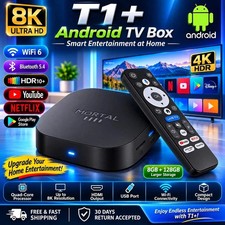 2026 New Android TV Box T1+ Rockchip RK3518 Android 16 8GB RAM 128GB ROM WiFi US$34.99
 AT&T DirecTV Streaming Player Android Box - C71KW-400 (Box + ac adapter only)$33.99
 Android 10.0 TV Box X96Q Quad Core HD 4K Media Stream Player Mini PC Dual WiFi$28.46
 Android 16 TV Box 8GB RAM 128GB ROM 8K UHD WLAN Bluetooth RK3518 Media Player$32.00
 2026 Android 16 Streaming TV Box 8K Voice Control 2GB/16GB Mortal T1 HDR WiFi 6$37.90
 Android 16 TV Box 8GB RAM 128GB ROM 8K UHD WLAN Bluetooth RK3518 Media Player$39.49
 OnePlus 15 Infinite Black 16GB+512GB US Unlock ( Open Box )$854.10
 www.userbars.org














