|
>> If you dont know how to design a userbar, then write here a Userbar that you want.
>> If you know how to design them help these people and design what they request.
|
 |
|
USERBARS.org | Free Forum Userbars
| On eBay now |

433MHz Wireless Remote Control Switch DC 12V 1CH RF Relay Module Transmitter
$4.10

DC 12V 433 Mhz RF Wireless Remote Control Switch relay 433mhz 1CH Receiver Module For Learning code Transmitter remote DIY
Input Voltage: 12 V, RF working mode: Superheterodyne
• Receiver sensitivity: > 97 dbm
• Transmitting distance:> 100 m ( open space)
• Decoding mode: MCU software decoding
• Remote storage: 20
• Support remote type: EV1527 learning code
• Working mode: Momentary, toggle, latching time delay (5s ,10s ,15s )
• Output terminal: NO , NC , COM
• Remote control battery: 2 x 3 V CR2016 button batteries
Note: Maximum input power is 250 V
Remote programming
Learning Methods:
1. Inching learning method:
Press the code pairing button on the control panel once, and the LED indicator will flash once. After the LED indicatorlit, press the button you need to pairing on the remote control, the LED indicator on the control panel will flash for 3 times which means the pairing succeed.
2. Self-locking learning method:
Press the code pairing button on the control panel twice, and the LED indicator will flash twice. After the LED indicatorlit, press the button you need to pairing on the remote control, the LED indicator on the control panel will flash for 3 times which means the pairing succeed.
3. Mutual lock learning method:
Press the code pairing button on the control panel three times, and the LED indicator will flash three times. After the LED indicatorlit, press the button you need to pairing on the remote control, the LED indicator on the control panel will flash for 3 times which means the pairing succeed.
4. 5S delay learning method:
Press the code pairing button on the control panel four times, and the LED indicator will flash four times. After the LED indicatorlit, press the button you need to pairing on the remote control, the LED indicator on the control panel will flash for 3 times which means the pairing succeed.
5. 10S delay learning method:
Press the code pairing button on the control panel five times, and the LED indicator will flash five times. After the LED indicatorlit, press the button you need to pairing on the remote control, the LED indicator on the control panel will flash for 3 times which means the pairing succeed.
6. 15S delay learning method:
Press the code pairing button on the control panel six times, and the LED indicator will flash six times. After the LED indicatorlit, press the button you need to pairing on the remote control, the LED indicator on the control panel will flash for 3 times which means the pairing succeed.
-Clearing the code :
Push the learning button on the receiver 8 times , the codes will be reset.
After clearing the code, remotes will be need to be recalibrated
When you click on links to various merchants on this site and make a purchase, this can result in this site earning a commission. Affiliate programs and affiliations include, but are not limited to, the eBay Partner Network.
|
|
|
|
|
|

 433MHz Wireless Remote Control Switch DC 12V 1CH RF Relay Module Transmitter$4.50
 12V 24V 2CH 433Mhz Wireless RF Relay Remote Control Switch Receiver Module Set$4.89
 3PCS 433mhz Gate Opener Remote Wireless Learning Code Remote Controller Cloning$9.62
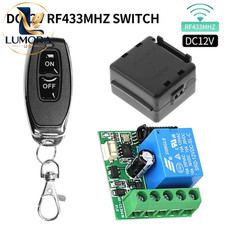 433MHz Wireless Remote Control Switch DC 12V 1CH RF Relay Module Transmitter$4.10
 433MHz Wireless Remote Switch DC 12V 1CH RF Relay & 2CH Transmitter Door Lock$8.15
 30A High-Power Wireless RF Relay Switch 110V-240V 433MHz Remote Control Receiver$9.49
 433MHz Wireless Remote Control Switch DC 12V 1CH RF Relay Module Transmitter$6.69
 30A High-Power Wireless RF Relay Switch 110V-240V 433MHz Remote Control Receiver$9.87












