2red24 2 red 24
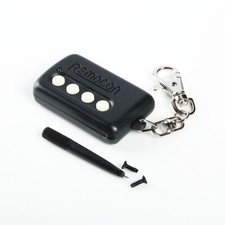
Replaces 4-Button CODE ALARM Keyfob Remote (PT4) (Obsolete); FCC ID: ELVATKC4-Button CODE ALARM Keyfob Remote (PT4) (No Longer Made). This part is User-Programmable. The control module in your vehicle must be programmed to accept the replacement part. Programming is a simple procedure. Instructions will beincluded with the replacement part and Remotes Authority provides phone support to assist you if you have any questions. Programming does require that your systemhave a working valet Button or switch. It is also very helpful (though not essential) that your alarm system have a working siren.
- An OE remote transmitter, not an aftermarket replacement
- Replacement for part with FCC ID GOH-FOUR (on back of case)
- User Programmable - Simple DIY instructions included with part
- Button configuration: Lock, Unlock, 1, 2
Manufacturer
CodeAlarm Code Alarm
Compatible FCC ID#(s):
GOH-FOUR or ELVATKC
Alternate Spellings
GOHFOUR, GOH FOUR, GOH-F0UR, GOH-FOUR, G0H-F0UR
Thisremote was used by many ford dealerships as a dealer installed upgrade. Systemsthat use this remote were installed by many alarm shops around the country inthe late 90s early 00s. The original FCC ID on the remote wasGOH-FOUR. Code Alarm recently redesigned the remote with FCC IDELVATKC.This is a Code Alarm Type 1 Remote, meaning it can be used toreplace or be replaced by any Type 1 Keyfob. This is a 315 MHzremote. This remote has4 buttons. There is a 434 MHz remotewith FCC ID GOH-FOUR that is easily confused with this one because it looksidentical. Code Alarm has made this remote with a few different buttonicons but they all operate the same way. No matter which icons are on theremote you receive, it will work the same as any other.
Workson these Code alarm Systems:
ELITE1100 ELITE1500 ELITE2000SE ELITE4000,ELITE4500, ELITE6500, ELITE911, ELITE950, ELITECOMPETITION, PRO100, PRO1000,PRO200, PRO3000, PRO3500, PRO5000, PRO5500, PRO7000, PRO750, RCS2, RKE1,SURESTARTRVS, SURESTARTRVSII, SURESTARTSE, and SURESTARTSE433.
Warning:There are two remotes with GOH-FOUR as an FCC ID. One of them works on315MHz and one of them on 434MHz. You need to order the correct one or itwon\'t work. This one is for 315MHz only.
Part #(s)
Canada- 1409-K1425
Button Count:
4 buttons: Arm, Disarm, Trunk/Option, Panic
Battery (installed):
1 GP23A
Frequency:
314 MHz
LED Light Color:
None
Circuit Board ID #’s:
PCB0112E, ROC 3/94
Compatible Aftermarket Installed Systems:
Code Systems Inc Vehicle Security System Transmitter -FOUR
CSM2.5, CSM3, CSM4, ELITE1100, ELITE1500, ELITE2000SE, ELITE4000, ELITE4500, ELITE6500, ELITE911, ELITE950, ELITECOMPETITION, PRO100, PRO1000, PRO200, PRO3000, PRO3500, PRO5000, PRO5500, PRO7000, PRO750, RCS2, RKE1, SURESTARTRVS, SURESTARTRVSII, SURESTARTSE, and SURESTARTSE433
Condition Notes:
Pre-Owned; ready to program to your vehicle\'s compatible RKE system. The remote you will receive will have a slightly worn buttons.
Programming: Please note not all customers will be able to complete the programming on their own so if you are having trouble or unsure diagnostic programming is available at your local qualified automotive locksmith or car/audio shop.
Programming Instructions:
Your security system has the ability to operate from up to four (4) remote transmitters. Follow these instructions to add a remote transmitter to your system.
1. Make sure the security system is disarmed and the ignition is off.
2. Without starting the vehicle, turn the ignition ON, OFF, then ON, at 1/2-second intervals.
3. Wait 5 seconds. Press the ARM button on the remote transmitter to be programmed. The siren will chirp once, indicating that the system has \"learned\" that transmitter.
4. Repeat step 3 for any additional remote transmitters.
5. Exit the Transmitter Programming Mode by turning the vehicle ignition on, then off. Test all remote transmitters to ensure that they work properly.
1. Make sure that you have all remaining remote transmitters available.
2. Enter the transmitter programming mode by following steps 1 and 2 under Adding Remote Transmitters to Your System (above).
3.
a. If you have only one remaining remote transmitter, press the ARM button on that remote transmitter four (4) times, pausing at least five seconds in between each press. Make sure that the siren chirps each time you press the ARM button.
b. If you have two remaining remote transmitters, press the ARM button on each remote transmitter two (2) times, pausing at least five seconds in between each press. Make sure that the siren chirps each time you press the ARM button.
c. If you have three remaining remote transmitters, press the ARM button on the first remote transmitter two (2) times, then press the ARM button on the other two remote transmitters once. Pause at least five seconds in between each press. Make sure that the siren chirps each time you press the ARM button.
4. When you are finished, the lost or stolen remote transmitter will no longer operate your system.
This security system utilizes a secret code for adding or deleting remote transmitters, changing system options and disarming the alarm if the remote transmitter fails to operate. The 4 digit code should be written on the front of this manual by your installer If not the code is found on a sticker on the back of the alarm module Below is the procedure for entering the code.
1. Enter the Code Entry Mode by following the steps in the Adding Remote Transmitters to Your System, Programming Selectable Options or the Emergency Disarm Procedure sections of this manual
2. Look at the first number in the code Allow the status indicator to flash the corresponding number of times as the first number in the code
3. After the status indicator has flashed the corresponding number of times, turn the vehicle ignition off The first number has been entered
4. Turn the ignition back to the ON position The status indicator will again begin flashing Repeat the procedure in steps 2 and 3 this time using the second number in the code
5. Repeat steps 2 and 3 for the third and fourth numbers in the code
6. After the fourth number has been entered correctly the alarm will disarm, or enter the desired programming mode
Note: If you enter an incorrect digit turn the vehicle ignition off then on. When the status indicator begins to flash, re-enter the code from the beginning
Example: The code is 2314
1. Enter the Code Entry mode The status indicator will begin flashing for Code Entry
2. Allow the status indicator to flash two (2) times After the second flash turn the vehicle ignition off
3. Wait one second then turn the ignition on
4. Allow the status indicator to flash three (3) times After the third flash turn the vehicle ignition off
5. Wait one second then turn the ignition on
6. Allow the status indicator to flash one (1) time After the flash turn the vehicle ignition off
7. Wait one second then turn the ignition on
8. Allow the status indicator to flash four (4) times After the fourth flash turn the vehicle ignition off
IMPORTANT!!!
Be sure to remember your code and keep it in a safe place. If the code is lost, it cannot be recovered.
When you click on links to various merchants on this site and make a purchase, this can result in this site earning a commission. Affiliate programs and affiliations include, but are not limited to, the eBay Partner Network.

 NICE Code Alarm 4-BUTTON CAT4P REMOTE TRANSMITTER FOB H5OT66 H50T66 ORANGE LED$22.50
 New OEM Code Alarm GOH-FRDPC2002 Remote Control Key Fob- 4 Button w/ DIY Program$24.75
 4-Button CODE ALARM FCC ID ELVATKC Car Starter Key fob keyless entry Remote PT4$49.96
 CODE ALARM CATX-MT 4-BUTTON RED LED REMOTE CAR STARTER KEY FOB H50T46 H5OT46 4bt$65.20
 Fixed Code Universal 4 Button Remote Control Garage Door Gates Auto Security$22.89
 Code Alarm CATX-MT *BRAND NEW* 4-Button Keyless Entry/Remote Start Fob (RED LED)$59.99
 NEW CODE ALARM 4-BUTTON GOH-PAN05 KEYLESS REMOTE START TRANSMITTER FOB - TESTED$15.00
 code alarm CAT4P 4-Button Transmitter Remote$24.87
 www.userbars.org














