REMOTE HAS FADED BUTTONS AND THE UNLOCK BUTTON HAS HOLES IN IT
SEE PICTURES OFR DETAILS
One (1)
Aftermarket remotekeyless entry fob alarm
Transmitter controlclicker keyfob controller replacement
Functions at 100% Tested &Guaranteed
PRESTIGE / PURSUIT/ AUDIOVOX/ PRO
FCC ID: ELVATOF
PART #: PROOE3C
FREQUENCY: 302MHz
LED COLOR: YELLOW/ORANGE
3 BUTTONS
COMPATIBLE WITH THE FOLLOWING SYSTEMS:
PRO9246FT3
PROGRAMMING THESE REMOTE(S)
It is important to remember that during programming, each individual step of the procedure must be executed within 15 seconds of the previous step.
When the 15 second time limit is allowed to expire, the system will automatically terminate the programming mode. This is indicated by a long chirp from the siren.
NOTE: Some keyless entry systems will flash the interior light to indicate a stored code. Substitute the words light flash below where indicated sounding device will beep.
Additionally, the system will store codes from up to four different transmitters.
If a 5th transmitter is programmed to any receiver channel, then the first transmitter programmed to that channel will be erased from the system's memory.
NOTE: Some systems may use a combination push-button LED switch. In these systems the push-button and the dash mounted LED are one and the same.
To Program replacement or additional transmitters:
- Enter the vehicle, and turn the ignition key to the "on" position.
- Press and release the valet push-button switch 3 times.
- The dash LED will flash one time, and the sounding device will beep one time, indicating the system is ready to accept programming for receiver's Lock channel 1.
- Press and hold the Lock transmitter button until the sounding device emits a long beep, indicating the signal has been stored into memory.
- If you have additional transmitters (up to 4) that need to be programmed, repeat step 4 for each transmitter.
- Press and release the valet push-button switch once.
- The dash LED will flash two times, and the sounding device will beep two times, indicating the system is ready to accept programming for receiver's Unlock channel 2.
- Press and hold the Unlock transmitter button until the sounding device emits a long beep, indicating the signal has been stored into memory.
- If you have additional transmitters (up to 4) that need to be programmed, repeat step 8 for each transmitter.
- Press and release the valet push-button switch once.
- The dash LED will flash three times, and the sounding device will beep three times, indicating the system is ready to accept programming for receiver's channel 3.
- Press and hold the selected Option transmitter button until the sounding device emits a long beep, indicating the signal has been stored into memory.
- If you have additional transmitters ( up to 4 ) that need to be programmed, repeat step 12 for each transmitter.
- Press and release the valet push-button switch once.
- The dash LED will flash four times, and the sounding device will beep four times, indicating the system is ready to accept programming for receiver's channel 4.
- Press and hold any button combination as shown on the front cover of this guide until the sounding device emits a long beep, indicating the signal has been stored into memory.
- If you have additional transmitters (up to 4) that need to be programmed, repeat step 16 for each transmitter.
- Press and release the valet push-button switch once.
- The dash LED will flash four times, and the sounding device will beep four times, indicating the system is ready to accept programming for receiver's channel 5.
- Press and hold any unused button combination as shown on the front cover of this guide until the sounding device emits a long beep, indicating the signal has been stored into memory.
- If you have additional transmitters (up to 4) that need to be programmed, repeat step 20 for each transmitter.
- Turn the ignition key off. The sounding device will emit one short beep followed by one long beep indicating the system has terminated the program mode.
Transmitter Battery Replacement
You will notice a decrease in transmitter range as the battery condition deteriorates. Transmitter battery replacement is recommended at least every 10 to 12 months, depending upon how frequently the transmitter is used.
The transmitter has a small LED visible through the case. This LED can be used to indicate battery condition. If the LED does not illuminate, then the battery is discharged, and must be replaced.
To replace the transmitter battery:
- Remove the small Phillips head screws from the bottom cover of the transmitter.
- Carefully unsnap the top cover of the transmitter from the bottom cover.
- Remove the discharged battery, making note of the location of the + and - contacts, and replace with a new type GP27A 12 volt battery.
Replace the transmitter cover, taking care not to damage the LED or switches on the circuit board, and secure with the small phillips head screw.
100% Guarantee Remote Shipping / ReturnPolicy
Yes. It will have a working battery installed.
Battery Condition:
Your vehiclewill be installed with one of the following keyless entry systems:
The aboveinformation can change which remote you need
for your installed remote keyless system.
Powered by
.
When you click on links to various merchants on this site and make a purchase, this can result in this site earning a commission. Affiliate programs and affiliations include, but are not limited to, the eBay Partner Network.

 Avital 4109L 1-Way Vehicle Remote Start System with Keyless Entry$59.50
 Remote Start & Keyless Entry Kit For 03-06 Chevrolet & GMC || Silverado & Sierra$225.00
 NEW OEM FORD F150 F250 80 BIT KEYLESS REMOTE HEAD KEY FOB 164-R8067 5912561$142.00
 OEM Remote Keyless Entry/Engine Start 72147TZ6A81 16-18 MDX/22-25 RDX No Key$99.99
 PRESTIGE APS997ZLR 2-Way 1-Mile LCD Remote Start and Security System Keyless$139.00
 TK800+ LCD Touch Screen Smart Key Remote Keyless Entry For All Start Stop Engine$49.95
 2X Keyless Entry Remote Start Car Flip Key Fob Control 4-Button Two$28.80
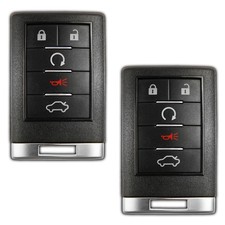 2 New Remote Start Keyless Entry Key Fob Control Replacement for OUC6000066 5b$28.45
 www.userbars.org














