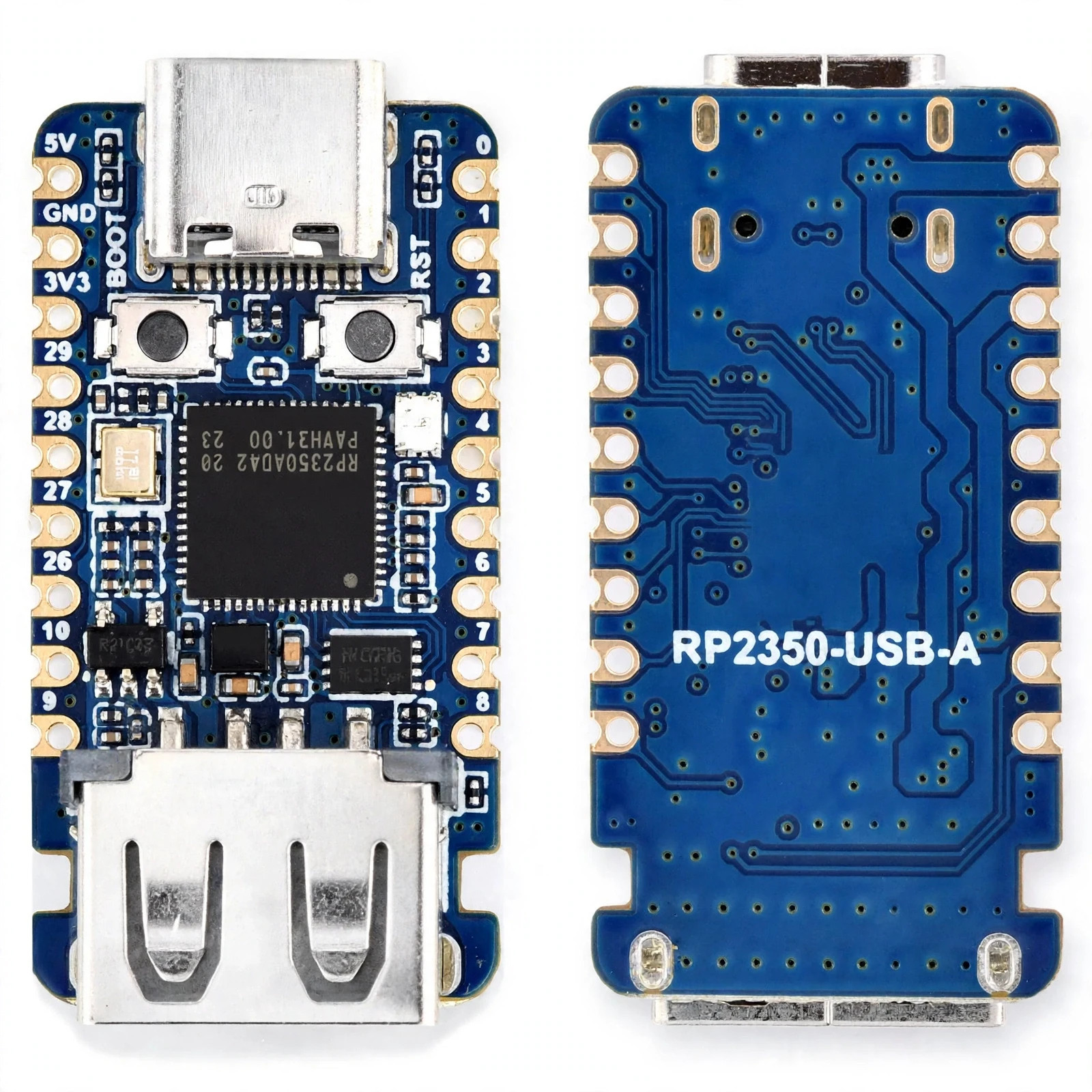
RP2350-USB-A Mini Development Boardp77SupplyRP2350 USB-A Mini Development Board Raspberry Pi RP2350A Type-C MCUCompact RP2350A Microcontroller Board with USB-A Interface & Type-C Power
Brandp77SupplyTypeDevelopment Board / Microcontroller Module
ModelRP2350 USB-A Mini
MicrocontrollerRaspberry Pi RP2350A
InterfaceIntegrated USB-A Connector
Power PortUSB Type-C Receptacle
ApplicationEmbedded Development, Prototyping, DIY Electronics
FeaturesCompact Design, Programmable, Castellated Half-Hole SMT EdgesListing VariationsStandard Development Board ModuleElevate your embedded electronics projects and DIY prototypes with the RP2350-USB-A Mini Development Board, built around the high-performance Raspberry Pi RP2350A microcontroller. Designed for makers, students, and professional engineers, this compact board features a unique onboard USB-A connector combined with a modern USB Type-C power input port, offering exceptional flexibility for programming and power delivery.
Featuring a castellated half-hole design, the board can be easily soldered directly onto custom carrier boards or used with standard pin headers on a breadboard. Whether you are developing IoT applications, building custom macro keyboards, or exploring advanced microcontroller programming, this versatile development board provides a reliable, high-speed platform for your next innovation.
- Raspberry Pi RP2350A MCU: Powered by the advanced RP2350A microcontroller architecture for fast processing and robust peripheral support.
- Integrated USB-A Connector: Features a direct USB-A plug layout, allowing the board to plug straight into standard computer ports or chargers without extra cables.
- USB Type-C Power & Data Input: Equipped with a reversible USB-C port for reliable power input and flexible connection options.
- Castellated Half-Hole Design: Enables surface-mount soldering directly onto custom PCB designs and carrier boards.
- Compact Form Factor: Miniature footprint ideal for space-constrained embedded projects, wearable electronics, and portable prototypes.
- Breadboard Friendly: Standard pinout layout compatible with standard solderless breadboards for quick circuit assembly and testing.
- Open-Source Ecosystem: Fully compatible with popular development environments, MicroPython, C/C++, and standard maker toolchains.
- Versatile Prototyping Platform: Perfect for hobbyists, engineering students, and professional developers building custom IoT and automation devices.
Microcontroller CoreRaspberry Pi RP2350A Dual-Core ArchitectureHost InterfaceOnboard USB-A Plug / Connector
Power Input InterfaceUSB Type-C Receptacle Port
Board ArchitectureMini Development Board with Castellated EdgesPinout CompatibilityStandard Breadboard-Friendly Pin HeadersProgramming EnvironmentsMicroPython, CircuitPython, C/C++ SDKOperating VoltageStandard 3.3V Logic / 5V Bus Power via USBBoard DimensionsCompact Pocket-Sized Form Factor (~35mm × 17.5mm)
- Static Electricity (ESD) Protection: Handle the board by its edges and utilize an ESD-safe mat or wrist strap when working in dry environments to prevent electrostatic discharge damage.
- Power Input Regulation: Ensure power sources adhere to standard 5V DC USB thresholds. Avoid unregulated high-voltage power supplies to prevent microcontroller failure.
- Short-Circuit Isolation: Verify correct pin wiring and polarity on breadboards before applying power to prevent short-circuiting the logic rails.
- Thermal Regulation: Allow adequate ventilation around the board during intensive compilation or heavy continuous processing tasks.
- Initial Inspection & Pin Configuration: Unpack the development board and inspect pins. Solder included header pins if using with a breadboard, or prepare for surface-mount installation via castellated holes.
- Connecting to Host Computer: Plug the board directly into an available computer USB port via its integrated USB-A connector, or use a USB-C cable connected to the Type-C port.Verification: Confirm that the onboard power LED illuminates and your computer detects the bootloader/serial device.
- Uploading Firmware/Code: Enter boot mode (using the BOOT button) and drag-and-drop compiled firmware or execute your script via MicroPython/C++.Verification: Check that code executes successfully and peripherals respond as programmed.
- Integrating into Projects: Mount the board onto your target custom PCB or breadboard circuit for final deployment.Verification: Confirm stable signal communication across all active GPIO pins.
Packaged Items:
- 1 × RP2350-USB-A Mini Development Board (Raspberry Pi RP2350A)
- 1 × Pin Header Set (Unsoldered / Pre-packaged as applicable)
- 1 × Protective Anti-Static Packaging Enclosure
When you click on links to various merchants on this site and make a purchase, this can result in this site earning a commission. Affiliate programs and affiliations include, but are not limited to, the eBay Partner Network.

 waveshare RP2350 USB Mini Development Board Based on Raspberry Pi RP2350 Dual-co$16.38
 RP2350A USB Mini Development Board, Based On Raspberry Pi RP2350A...$21.70
 Waveshare RP2350A USB Mini Development Board, Based on Raspberry Pi RP2350A$27.99
 RP2350A USB Mini Development Board, Based on Raspberry Pi RP2350A Dual-Core & Du$26.18
 waveshare RP2350 USB Mini Development Board Based on Raspberry Pi RP2350...$18.31
 RP2350A USB Mini Development Board, Based on Raspberry Pi RP2350A Dual-Core & Du$18.91
 Waveshare RP2350A USB Mini Development Board, Based On Raspberry Pi RP2350A...$20.58
 RP2350A USB Mini Development Board, Based On Raspberry Pi RP2350A...$20.99
 www.userbars.org