Manufacturer
Omega, Mundial
Compatible FCC ID#(s):
L2M4415, VGA4415 K9- 4
Alternate Spellings
L2M 44I5, L2M44I5, L2M4415, L2M44IS
Part #(s)
078-6588 4415-01
Button Count:
Battery (installed):
2; CR2016
Frequency:
433-434 MHz
LED Light Color:
Blue
Circuit Board ID #’s:
E321748, 4415TX, REV B
Compatible Aftermarket Installed Systems:
Condition Notes:
Pre-Owned; ready to program to your vehicle\'s compatible RKE system. The remote you will receive will have silver paint on the remote\'s buttons is wearing off, please see photos.
Programming: Please note not all customers will be able to complete the programming on their own so if you are having trouble or unsure diagnostic programming is available at your local qualified automotive locksmith or car/audio shop.
Step 1:
Turn the vehicle\'s ignition \"On\" then \"Off\".
Step 2:
Within 10 seconds of turning the ignition \"Off\", press the Valet/Override
Switch 5 times. A siren burst, then a single chirp will confirm entry.
Step 3:
Within 7 seconds of entering Features Programming Mode, press the Valet/
Override Switch a number of times equal to the number of the feature to be programmed.
- The system will repeat the feature number with same number of siren chirps.
Step 4:
After the system acknowledges the feature to be programmed, press
either the Transmitter Arm/Lock Button to turn the feature on (1 chirp confirmation), or the Disarm/Unlock Button to turn the feature off (2 chirps confirmation).
NOTE:
To program more features, simply repeat Steps 3 and 4. If seven seconds expire
without any programming activity or if the ignition is turned “On”, the system will automatically exit Features Programming Mode. Two siren bursts confirm exit.
Whenever a transmitter, new or existing, is programmed to the system, all existing codes are erased for security. So all of the transmitters which are to operate the system, which can be up to four, must be programmed at the same time
Step 1:
Turn \"On\" the vehicle\'s ignition.
Step 2:
Within 10 seconds press the Valet/Override Switch 5 times. The system
responds with 1 siren burst to confirm Transmitter Programming Mode.
Step 3:
Within 10 seconds, press the Small Button on each transmitter to be programmed. The response to each is 1 and 1, 1 and 2, etc., chirps. If 17 seconds expire without any programming activity the system will automatically exit Transmitter Programming Mode. Turning off the ignition switch will also exit the system from Transmitter Programming Mode; in either case the system signals the exit with 1 long siren chirp.
Unauthorized Transmitter Alert:
For the next 48 hours after transmitter programming, every time the vehicle’s ignition is turned “On”, the system will emit a series of siren chirps, and the LED Status Indicator will show the number of programmed transmitters for 90 seconds instead of 10 seconds
When you click on links to various merchants on this site and make a purchase, this can result in this site earning a commission. Affiliate programs and affiliations include, but are not limited to, the eBay Partner Network.

 For Ford Replacement Alarm Remote Keyless Entry Control Key FOB Clicker 4 Button$6.99
 NEW OEM CHEVY CHEVROLET GM KEYLESS ENTRY REMOTE KEY FOB TRANSMITTER ABO0104T $69.85
 for 2003 2004 2005 2006 2007 Honda Accord Keyless Remote Car Entry Key Fob Pair$14.20
 NEW OEM 2021-2026 CHEVY BLAZER KEYLESS REMOTE ENTRY SMART KEY FOB 13564991$65.95
 2 For 2000 2001 2002 2003 Toyota Tundra Keyless Entry Remote Car Key Fob$23.70
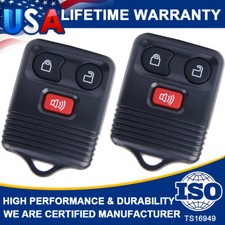 2 Keyless Entry Remote Control Car Key Fob Transmitter For Ford 99-07 F-150 F250$6.99
 For 2008 2009 2010 2011 2012 2013 Toyota Corolla Keyless Remote Entry Key Fob$14.20
 NEW Porsche Keyless entry SMART PROX key remote fob KR55WK50138 / 7PP959753 BQ$74.99
 www.userbars.org














