modname=ckeditor
Dual 100K/50K Remote Control Volume Digital Potentiometer, Volume/tone/equal Loudness/remote Control
Model1: 100K+ remote control
Model 2: 50K+ remote control
Model 3: 100K + remote control + display
Model 4: 50K + remote control + display
Trade name:Duplex100K/50KRemote control volume digital potentiometer volume/tone/Equal sound/display/enlarge/remote control
purpose:
Power amplifier,Audio volume adjustment,Replace traditional mechanical potentiometer,It cannot be used for other purposes
characteristic:
1.Digital potentiometer is composed of integrated circuit chip, Solving the sliding noise problem of traditional mechanical potentiometer
2.With memory function,Boot is in the last volume position
3.With mute function,Press the potentiometer to silence,Press again to exit mute
4.Volume control range: -79dBto+10dB,1dBstep,display0~90,0dBThe above is the automatic amplification function
5.Tone control: bass/Baritone/a treble,-9dBto+14dB,1dBstep
6.Equal sound function: It can be turned on or off,When the volume is turned on, it will compensate when it is turned off,Turn up the volume and it will not work automatically
7.Preamplifier function:
OP1Turn on this function when the solder joint is short circuited(Not open by default),For low volume output equipment,as:computer,mobile phone,MP3etc.,If you want to use the equal sound function,It is recommended to turn on the preamplifier for good results,It\'s only useful when the volume is turned down,Don\'t turn on the volume too much after turning on the preamplifier,The equal sound function works,High and low frequencies sound more adequate
8.Input impedance: 100Kor50KOptional
9.Maximum I / O signal:
2.1Vrms@THD+N=1%
10.working voltage : direct12V-15V,
11.You can choose the style of remote control volume and digital tube display volume
12.Board size: 28X36mm
13.Provides a subwoofer signal output,Cutoff frequency85HZ,There is no socket for this signal,No cable,If it is used, you need to lead it out by yourself
14.Can learn from othersNECCoded remote control,wrongNECCoded remote control not supported
Cargo list:
Input and output wiring(3P)One for each,One power supply line(2P)
Remote control and display cable are also well equipped
How to use tone and equal tone:
In order to use this function, you need to purchase the display,Otherwise, it cannot be used!!!!!!!!
1.Coding switch or remote controlON/OFFKey short press is mute function
2.Coding switch or remote controlON/OFFKey long press5Seconds to be displayed\"Lo\"Indicates entering the equal sound setting mode,Turn the coding switch or the remote control volume up and down key to turn on the equal sound function(display\"on\")He Guan(display\"oF\"),This function only works when the volume is turned down
3.In setup mode,Press the coding switch or the remote controlON/OFFKey to enter the function conversion,The function parameters can be adjusted by turning the coding switch or the remote volume up and down key,The configurable functions are as follows:
(1).loudness -->display\"Lo\",Adjustable opening(display\"on\")Or close(display\"oF\")
(4).a
4.When adjusting the treble, press the coding switch or the remote control againON/OFFKey to exit,You can also exit automatically for a long time
Learn about other remote controlsusage method:
In order to use this function, you need to purchase the display,Otherwise, it cannot be used!!!!!!!!
Only learningNECCoded remote control,wrongNECCoded remote control not supported
Press and hold the coding switch to be displayed\"Lo\"After not let go, continue to press to display\"88\",Turn left to learn,
display\"dn\"Press the volume down button when the volume is down,Automatic display of learning success\"uP\"Press the volume plus button again,Automatic display of learning success\"--\"Press the mute key again,If you always fail to learn,The display will not change,This indicates that the remote control is notNECcode,I won\'t support it,It needs to be replacedNECIt\'s coded
When you click on links to various merchants on this site and make a purchase, this can result in this site earning a commission. Affiliate programs and affiliations include, but are not limited to, the eBay Partner Network.

 1x CLAROSTAT D53C1 Dual Ganged 2 Watt POTENTIOMENTER 25K 50K or 100K Linear NOS$24.95
 RK097G Dual Potentiometers 15mm Shaft Horizontal 5K 20K 50K 100K Value PCB Mount$5.29
 HIFI 24-Step Stereo Attenuator Potentiometer dale resistance 10K 50K 100K 250K$60.51
 Japan ALPS RK27 Volume Log Potentiometer Dual Audio 2-gang 10K 20K 50K 100K 250K$32.00
 10pcs 100K ohm B100K Dual Stereo Potentiometer Pots Shaft S 15mm 6Pin$10.96
 ALPS Dual 6-Pin Volume Potentiometer A10K A50K A100K for Amplifier Speaker$14.89
 1PC RK12 Dual 6-pin B10K 20K 50K 100K volume potentiometer #TT$5.81
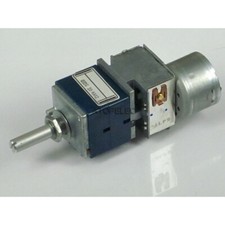 Japan ALPS RK27 Motorized LOG Stereo Potentiometer Dual 10K/50K/100K 2-gang$34.32
 www.userbars.org














