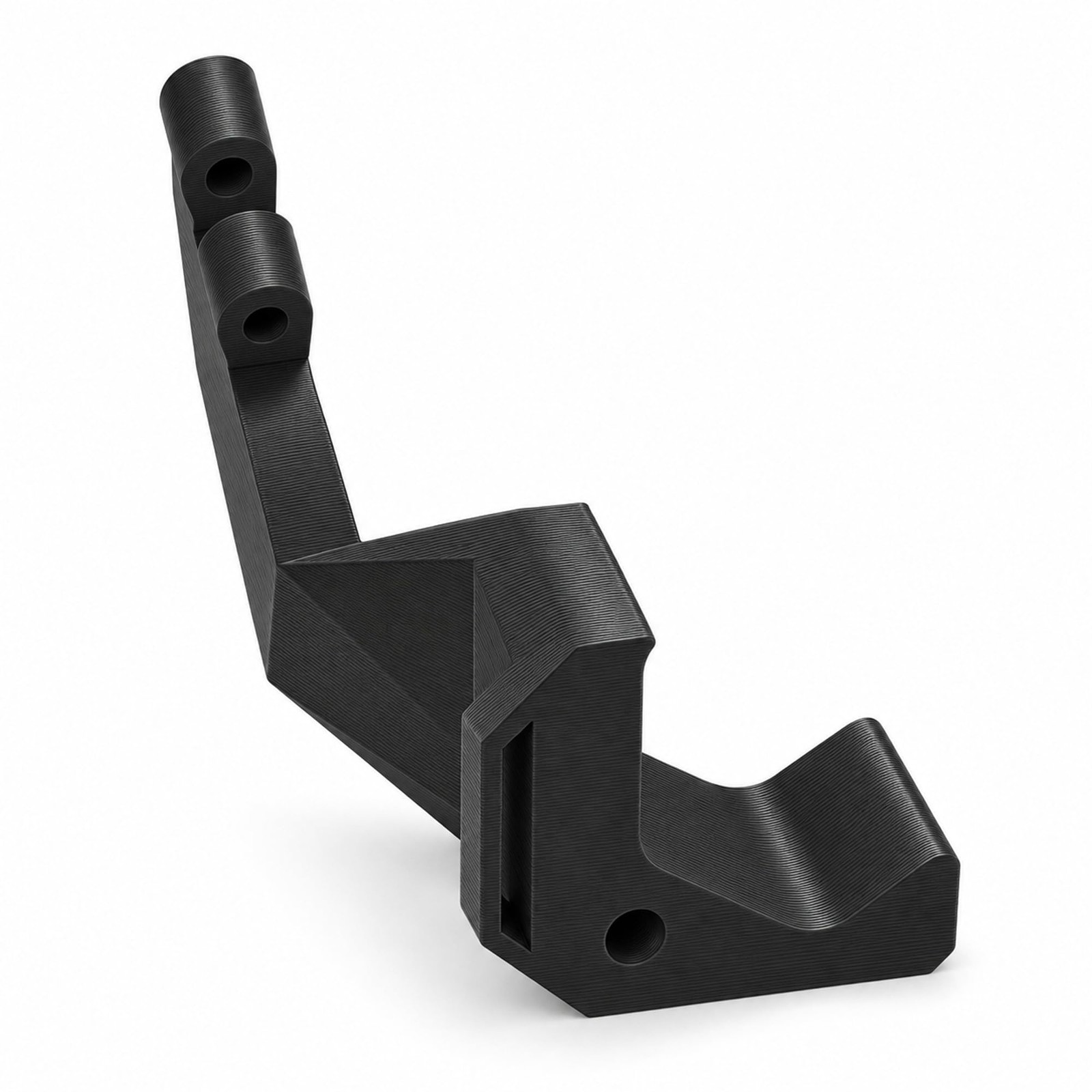
Camera Mount Compatible with Raspberry Pi Camera v2 – Compatible with Mk3S
- CLOSE-UP NOZZLE VIEW — See what is happening at your nozzle while your 3D printer runs, with a camera mount that positions your camera for a close-up look at the area you want to inspect. When a print needs investigation, that focused perspective gives you a way to observe the nozzle during printing and troubleshoot from a view of the working area, rather than relying only on the finished result.
- X-AXIS CAMERA POSITION — Put your camera on your 3D printer\'s X-axis rather than its bed, using the X-axis motor as the mounting point for a dedicated nozzle-viewing setup. Attach the camera body to the mount with two M3x12 bolts, then attach the mount to the motor with one M3x18 bolt; these required bolts are not included, so purchase them separately before setting up your camera for print monitoring. Screws and other hardware are not included.
- SQUARE-SURROUND CAMERA FIT — Match your camera to a body that accommodates the square surround around its lens, giving your nozzle-viewing setup a fit based on your camera\'s specific shape. Bring that camera into your 3D printer\'s monitoring arrangement for routine progress checks and closer investigation, whether you are following a print at your home workbench or looking into an unexpected result in your workshop.
- PIVOT YOUR VIEW — The hinge at the camera body provides a pivot point for orienting your camera as you arrange a close-up view of your nozzle. Use that pivot during setup to direct your camera toward the area you want to observe, making the nozzle the focus of your 3D printer\'s monitoring arrangement whether you are following a routine job or looking more closely at an unexpected printing result.
- HANDS-FREE PRINT CHECKS — Watch your print area without holding your camera, freeing your hands while the mount keeps your camera in position for nozzle viewing. At your home workbench or in your workshop, use the mounted camera to follow a job\'s progress and investigate printing problems, with your attention on what your 3D printer is doing instead of on keeping a handheld camera pointed at the nozzle. WHAT\'S IN THE BOX — Only the item named in the title. No hardware is included (see the description).
Get a closer look at the part of your print you want to understand. This X-axis camera mount holds your camera in position for a close-up view of your 3D printer\'s nozzle. Instead of keeping a camera in your hand, you have a mounting position for watching the nozzle while printing is underway. When a job needs investigation, that view gives you a way to observe the process as it happens, rather than working only from the result left on the bed.
The mount attaches to your 3D printer\'s X-axis motor rather than its bed, giving your camera a dedicated location for nozzle monitoring. Use it at your home workbench or in your workshop when you want to follow print progress or look into a printing problem. A routine check and a focused troubleshooting session both start with a view of the area you want to understand.
The camera body accommodates the square surround around your camera\'s lens, so the mounting arrangement accounts for that specific camera shape. A hinge at the camera body provides a pivot point for positioning your camera. Use that pivot as you arrange the close-up view, directing your camera toward the nozzle rather than settling for a general view of your 3D printer.
To fit the mount, connect the camera body to it using two M3x12 bolts, then attach the mount to the X-axis motor using one M3x18 bolt.
HARDWARE NOT INCLUDED: Only the item named in the title is in the box. Every setup is different: depending on yours, mounting it or attaching it to an existing part may use hardware you already have, such as the original screws, or you may need to buy your own screws, bolts, tape or adhesive to suit your situation. No hardware of any kind is included with this listing.
Hardware needed (not included): 2 × M3×12 bolts, 1 × M3×18 bolt. Screws, bolts, nuts, anchors, adhesive, adapters, cables and any other hardware are also not included, so buy what you need separately.
When you click on links to various merchants on this site and make a purchase, this can result in this site earning a commission. Affiliate programs and affiliations include, but are not limited to, the eBay Partner Network.

 Camera Mount – Compatible with Ring Spotlight Cam Pro Wired, Pro and Plus, Black$16.99
 Rear Camera Mount Compatible with Toyota 4Runner, Black$24.98
 3 Pack Camera Mount Compatible with AutoDarts Corona Vision, Black$82.99
 2PCS PTZ Camera Bracket Universal PTZ Camera Mount Bracket Compatible$58.99
 Camera Mount Compatible with Ring Spotlight Cam Pro, Black$20.99
 Camera Corner Mount Compatible with Reolink TrackMix Wifi, Black$88.99
 Anti-Theft Doorbell Camera Mount Compatible with Ring Battery Doorbell 2Nd Gen ($13.95
 Rear Camera Mount Compatible with Wolfbox G900Pro, Black$15.99
 www.userbars.org